


Transparency has emerged as a key player in today’s digital landscape, particularly within the realm of product supply chains. In an era where consumers are increasingly conscientious about the origins and processes behind the products they use, understanding the pathways of goods throughout the supply chain has become paramount. This heightened awareness among consumers has underscored the significance of traceability, ushering better means to equip stakeholders with the ability to trace and track the journey of products from their inception to the hands of the end-user.
Even though the digital revolution was initiated by the invention of the computer in the mid-20th century, the era of digitalization didn’t pick up pace on a global level until the 1980s. The U.S. Food and Drug Administration (FDA) established guidelines for Electronic Records in 1997 by introducing the 21 CFR Part 11 regulation, which presented the specific compliance requirements for digital documentation systems.
Adherence to this regulation necessitates assigning a digital signature to a specific individual, specifying the signature type (such as review, approval, or authorship), and ensuring traceability from the document back to the signer through secure electronic signatures, access controls, and audit trails, fostering accountability throughout the product lifecycle. By complying with the 21 CFR Part 11 regulation, businesses can instill confidence in consumers, regulatory bodies, and stakeholders alike.
In the continuously progressing landscape of tech-enabled quality and risk management, accessing an audit log, preferably in real-time, has become an integral aspect of an organization’s daily operations.
By examining audit logs and interconnected audit trails, administrators of systems can monitor user actions, and validate compliance to regulatory standards. This process allows for a thorough understanding of a system’s operational dynamics, contributing to both proactive management and reactive responses to quality and safety incidents.
A Glimpse into 21 CFR Part 11 Regulation’s Audit Trail Requirements
It was in 1997, that the 21 CFR Part 11 regulation was introduced, affirming the equivalence of electronic records and signatures, meant for regulatory compliance, to their paper and handwritten counterparts. This regulation extends approval for the adoption of electronic record-keeping systems in the maintenance of records and the submission of information to regulatory authorities. These rules are applicable to FDA-regulated industries using electronic records and electronic signatures.
While 21 CFR Part 11 does not replace existing FDA regulations, it builds upon FDA predicate rules, ensuring companies using digital systems adhere to compliance-related processes. Adherence to core FDA Predicate rule principles remains vital for understanding and implementing 21 CFR Part 11 controls relevant to regulated products.
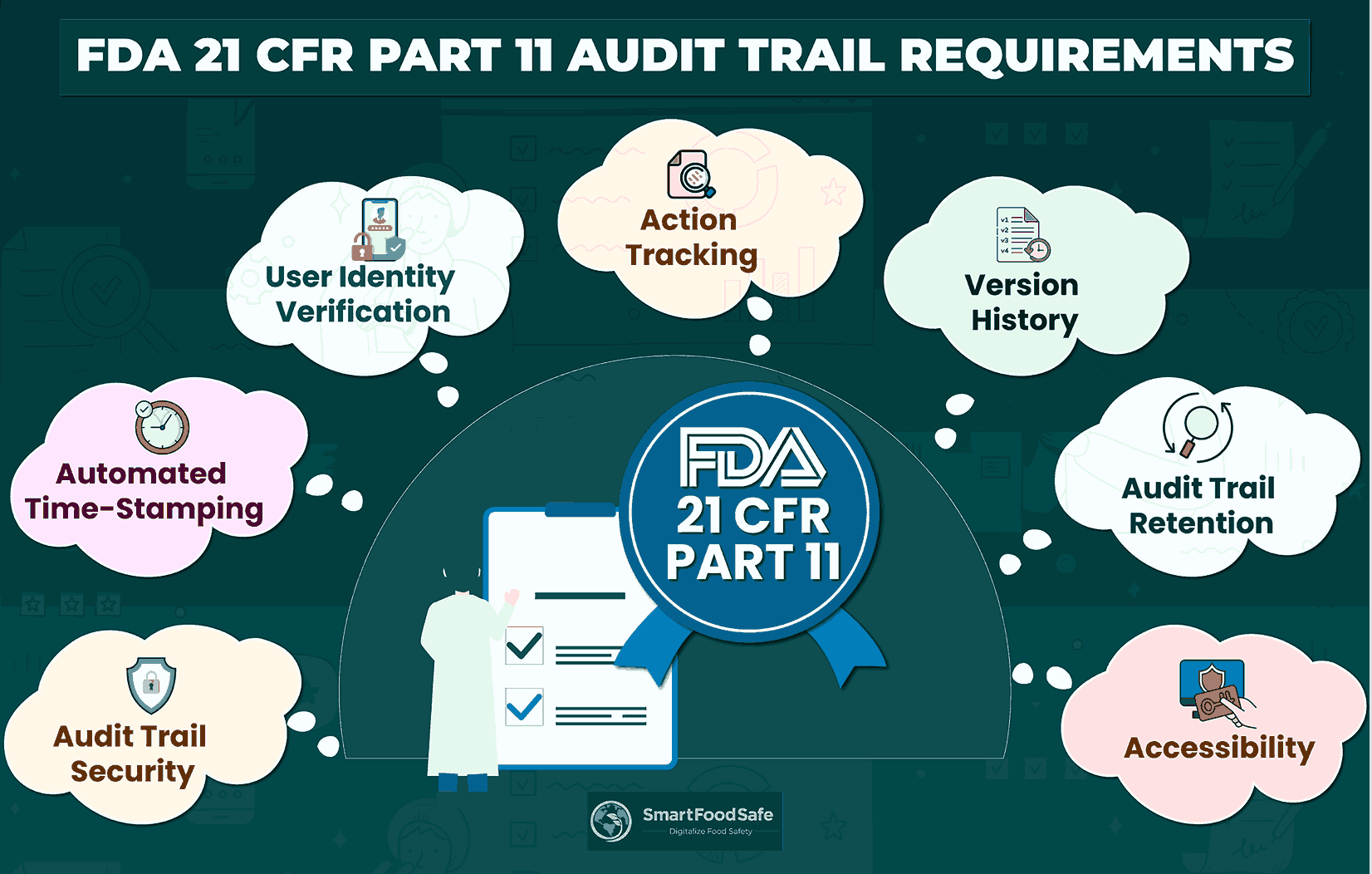
Here’s a quick summary of specific audit trail requirements according to FDA’s 21 CFR Part 11:
As per this regulation, every electronically stored record must possess a computer-generated, time-stamped audit trail to ensure traceability. Audit trails play a crucial role in meeting the compliance requirements outlined in 21 CFR Part 11, providing a comprehensive record of all activities within a computer system.
The FDA definition for audit trails used in computerized systems is as follows:
“An audit trail is a secure, computer-generated, time-stamped electronic record that facilitates the reconstruction of events related to the creation, modification, and deletion of an electronic record.”
The 21 CFR Part 11 Subpart B Sec. 11.10 Controls for Closed Systems elaborates that persons who use closed systems to create, modify, maintain, or transmit electronic records shall employ procedures and controls designed to ensure the authenticity, integrity, and, when appropriate, the confidentiality of electronic records. It also emphasizes the use of secure, computer-generated, time-stamped audit trails to independently record the date and time of operator entries and actions that create, modify, or delete electronic records. These audit trails are mandated to meet the following requirements:
1. Audit Trail Security: Authorized individuals must exclusively have access to the system, allowing them to make changes and sign off documents. This guarantees the audit trail’s security, aligning with 21 CFR 11.10(e). Restricting access to authorized personnel, as specified in 21 CFR 11.10(d), is essential for maintaining the integrity of the audit trail.
2. Automated Time-Stamping: Adhering to 21 CFR 11.10(e), the system should automatically document the time and date of electronic record actions, including creation, modification, document approval, retirement events, etc.
3. User Identity Verification: Recording the user’s identity for actions performed within the system is imperative, aligning with 21 CFR 11.10(g). Authority checks must be in place to ensure that only authorized individuals can utilize the system.
4. Action Tracking: As stipulated in 21 CFR 11.10(e), the audit trail should comprehensively capture and record all actions and changes made to electronic records. It should also facilitate easy comparison of document versions and seamless restoration of previous versions when necessary.
5. Version History: The audit trail must not hide or overwrite previously recorded information, ensuring a complete and unaltered record of actions with proper version history for all changes made.
6. Audit Trail Retention: Compliance requires the audit trail to be stored for a duration appropriate to the record’s content and purpose. Regular data backups and disaster recovery plans further safeguard against data loss in unforeseen events.
7. Accessibility: The audit trail should be readily accessible for review and copying during inspections. Organizations may also streamline the process by creating document collections with relevant records for upcoming audits.
Audit Logging, Audit Logs & Audit Trails
Audit logging entails the systematic documentation of activities taking place within the software systems deployed in an organization. These logs meticulously capture the details of each event, including the event’s occurrence, the precise time it transpired, the user or service responsible, and the entity affected.
When these individual logs are organized in a sequential manner, they collectively form what is known as an audit trail, offering a comprehensive record of all activities within a specific system. In simpler terms, an audit trail serves as a chronological account of all actions performed in a document, including details such as the person responsible for the action, the timing of the action, the nature of the action taken, and any other pertinent information. They are instrumental in tracking the chronological development of documents, ensuring that they remain unaltered in a manner that could compromise their accuracy or reliability.
Anatomy of Audit Log
Definition
An audit log is a chronologically ordered record, marked with date and time, that captures the history and specifics of various activities such as transactions, work events, product development stages, control executions, or entries in financial ledgers. It serves to document a sequence of events related to virtually any type of work process, whether executed manually or automatically.
Types of Activities Recorded
Audit logs serve as a valuable resource for demonstrating ongoing compliance during inspections and audits and can be employed to capture a wide array of activities and events, such as:
- User logins and logouts: Recording when users log in or out of a system provides a foundation for tracking user activities and ensuring secure access. User activity, including actions like logins, logouts, and any user-initiated operations within the system, can be monitored.
- Access control: Details about who accessed specific files or databases, when, and what actions were performed (read, write, modify) are critical for compliance activities. Access control is maintained by the audit log, which tracks modifications to access rights and permissions.
- Document revisions and approvals: Tracking changes made to relevant documents, including revisions, edits, and approvals can be carried out with an audit log. It can also serve to record the details of individuals who initiated document changes and those who approved them.
- System configurations: Changes to system configurations, settings, or permissions are logged to monitor alterations that might impact the stability and security of the system. System events can also be documented in the audit log, offering insights into system functionality, execution of operations, and identifying potential performance issues.
- Supplier and vendor interactions: Systematically monitor and record all engagements with suppliers and vendors to maintain a detailed log of any modifications made to supplier agreements, contracts, or quality requirements, enabling effective oversight and documentation of the evolving relationships and terms.
- Non-conformance reporting: Capturing information on quality events, incidents, and non-conformances can be executed effectively with audit logs by documenting any deviations or issues, and the actions taken to address and rectify non-conformities.
Key Components
Audit logs typically encompass a variety of components that collectively form an extensive record of system activities. These often include
Timestamps: Accurate timestamps are critical for establishing the chronology of events recorded in the audit log. They enable a step-by-step reconstruction of activities, aiding in both real-time incident response and post-event analysis.
User Identification: User identification information, such as usernames or unique identifiers, is recorded to attribute specific actions to individual users. This helps in tracking user behavior and detecting unauthorized access or activities.
Event Descriptions: Each entry in the audit log includes a description of the event or activity. This can range from routine operations like file access or system logins to more critical events such as configuration changes.
Outcome or Result: Audit logs often note the outcome or result of an event. For instance, if a user attempted to access a restricted file, the log might indicate whether the access was granted or denied.
Major Challenges Faced in Audit Log Implementation
Integration Complexity
Implementing an audit log often requires seamless integration with existing systems and applications. The complexity of integrating with diverse platforms, databases, and applications within an organization can pose a significant challenge.
Configuring Granular Logging
Setting up the audit log to capture the right level of detail without overwhelming the system with excessive data can be challenging. Configuring granular logging to track specific user activities, access control changes, and system events without compromising performance requires careful planning and expertise.
Retention and Storage Costs
Maintaining an extended data retention period comes with increased storage costs. Balancing the need for historical log data with the associated storage expenses poses a financial challenge. Organizations need to find a cost-effective solution that meets both compliance requirements and budget constraints.
Ensuring Scalability
As the organization grows, the audit logging solution must scale accordingly. Ensuring that the chosen platform can handle the increasing volume of log data efficiently is crucial for maintaining optimal performance and responsiveness.
Data Overload
In settings characterized by a high frequency of events, audit logs may swiftly become inundated with an overwhelming amount of data. The task of effectively managing, storing, and analyzing this extensive information can pose a substantial challenge, often necessitating considerable resources.
System Performance
The act of recording each event can have repercussions on system performance. This may manifest as latency or bottlenecks, particularly problematic in real-time systems or environments with stringent performance requirements. Unauthorized access or tampering poses a risk to the reliability of the logs.
Complexity in Log Review
Conducting a comprehensive review of audit logs can be intricate due to the sheer volume of data. Identifying significant events amidst numerous routine activities may prove to be a time-consuming endeavor.
Event Correlation
Effectively analyzing logs often involves correlating events from diverse sources to discern patterns or security threats. This task can be intricate, especially when dealing with a variety of systems and applications.
Essential Functionalities for Compliant Audit Logs
By incorporating the following capabilities, an audit log tool can help organizations overcome the existing challenges and meet the specified requirements for compliant audit logs:
1. Effective Log Management: Look for a tool that possesses thorough log management capabilities, capable of capturing a wide range of system and user activities. This includes tracking access control changes, system events, and data access.
2. User-Friendly Interface: Opt for a platform with an intuitive and straightforward interface. This ensures ease in searching, filtering, and analyzing logs, enhancing overall usability.
3. Compliance Adherence: Verify that the audit logging tool complies with relevant standards. It should align with industry and regulatory requirements such as HIPAA, PCI DSS, and GDPR to ensure your organization remains compliant.
4. Robust Reporting and Dashboards: A dependable audit logging solution should offer dashboards providing an overview of log events. Additionally, it should include customizable reporting features to generate detailed reports on log entries.
5. Scalability and Performance: Ensure the chosen platform can handle large volumes of log data efficiently, maintaining fast analysis capabilities even as data volume increases.
6. Data Retention: Data retention ensures the preservation of historical records for compliance and accountability purposes. Various mechanisms, such as time-based retention policies and event-triggered archiving, are employed, with cloud-based solutions allowing organizations to securely store and retrieve audit logs in a dynamic and efficient manner.
Cloud-based logging solutions are emerging as a pivotal future trend in audit logging, offering scalable and flexible frameworks for handling the burgeoning volume of network, hardware, and application logs. These solutions leverage cloud infrastructure to provide seamless integration, storage, and real-time analysis of diverse log data formats. By adopting cloud-based logging, organizations can efficiently manage audit trails at scale, ensuring accessibility and adaptability. This approach enhances overall system security and operational efficiency, empowering teams to gain valuable insights through advanced analytics and machine learning models. As the landscape of audit logging continues to evolve, cloud-based solutions present a forward-looking strategy to address the challenges posed by the dynamic nature of network behavior and the ever-expanding scope of audit log data.
How Smart Food Safe Incorporates Audit Log Features To Enhance Our Digital Modules?
Being a cloud-based quality, food safety, traceability, and compliance management software, Smart Food Safe has integrated the feature of audit logs into our wide range of software modules. These audit logs systematically record and track every significant action, event, or transaction within the platform’s environment, providing a detailed logging mechanism that ensures a chronological account of user activities, system changes, and data modifications. By incorporating audit logs, Smart Food Safe empowers users to monitor and analyze the entire lifecycle of information, providing elevated transparency and traceability.