


 English
▾
English
▾
English
▾
English
▾
It is usually believed that records management predominantly encompasses the concept of knowing what you have, where you have it, and how long you have to keep it. But what if it could be so much more rewarding with less tediousness associated with paper-based processes? This is what an enterprise can achieve with form management software in the era of records being the starting point of maintaining regulatory compliance.
Records are the lifeblood of a business, influencing every aspect of its operations. It’s no surprise that tech-enabled solutions for managing forms have become essential in today’s market. With numerous capable options available, selecting the best form management software tailored to your organization’s specific needs can feel overwhelming.
To simplify the process, this guide outlines the essential features to look for in form management software and offers tips on evaluating them against your company’s requirements. We’ve also compiled a list of leading solutions to help you get started.
Form management software is a digital solution designed to manage the lifecycle of records, from creation and storage to eventual disposal. It involves a form builder that enables users to create, customize, and manage digital forms for collecting and organizing data. It is equipped with targeted features to streamline how businesses handle records, ensuring that critical information is accessible, secure, and compliant with legal and organizational standards.
The following are the core functions that form management covers:
Creating and Storing Records – A form management system facilitates the creation of digital records, replacing paper-based systems. It securely stores these records in a centralized repository, enabling easy retrieval and reducing the risk of loss or damage.
Indexing and Classifying Records – Metadata-based organization is a cornerstone of a form management system. It allows users to classify records by attributes such as dates, authors, subjects, or categories. This feature enhances searchability and ensures that forms are easy to locate.
Securing Records – Strong security measures are integral to form management software. Features like role-based access controls, encryption, and permission settings ensure that sensitive records are only accessible to authorized personnel, safeguarding them against breaches or unauthorized access.
Auditing and Compliance – Form management software generates audit trails that track every interaction with a record. This functionality is important for demonstrating compliance with regulatory requirements and providing transparency in form management practices.
Disposing of Records – Form management software ensures proper record disposal according to predefined policies. Whether records are deleted or archived, it supports compliance with data retention laws and helps mitigate risks associated with improper disposal.
In short, form management software equipped with form builders is more than just a digital filing cabinet; it’s a strategic tool that ensures businesses can manage their information productively, securely, and compliantly. With its ability to adapt to diverse industries and handle a variety of form types, the software empowers organizations to maintain order in their data, minimize risks, promote document collaboration, and meet regulatory demands like a walk in the park.
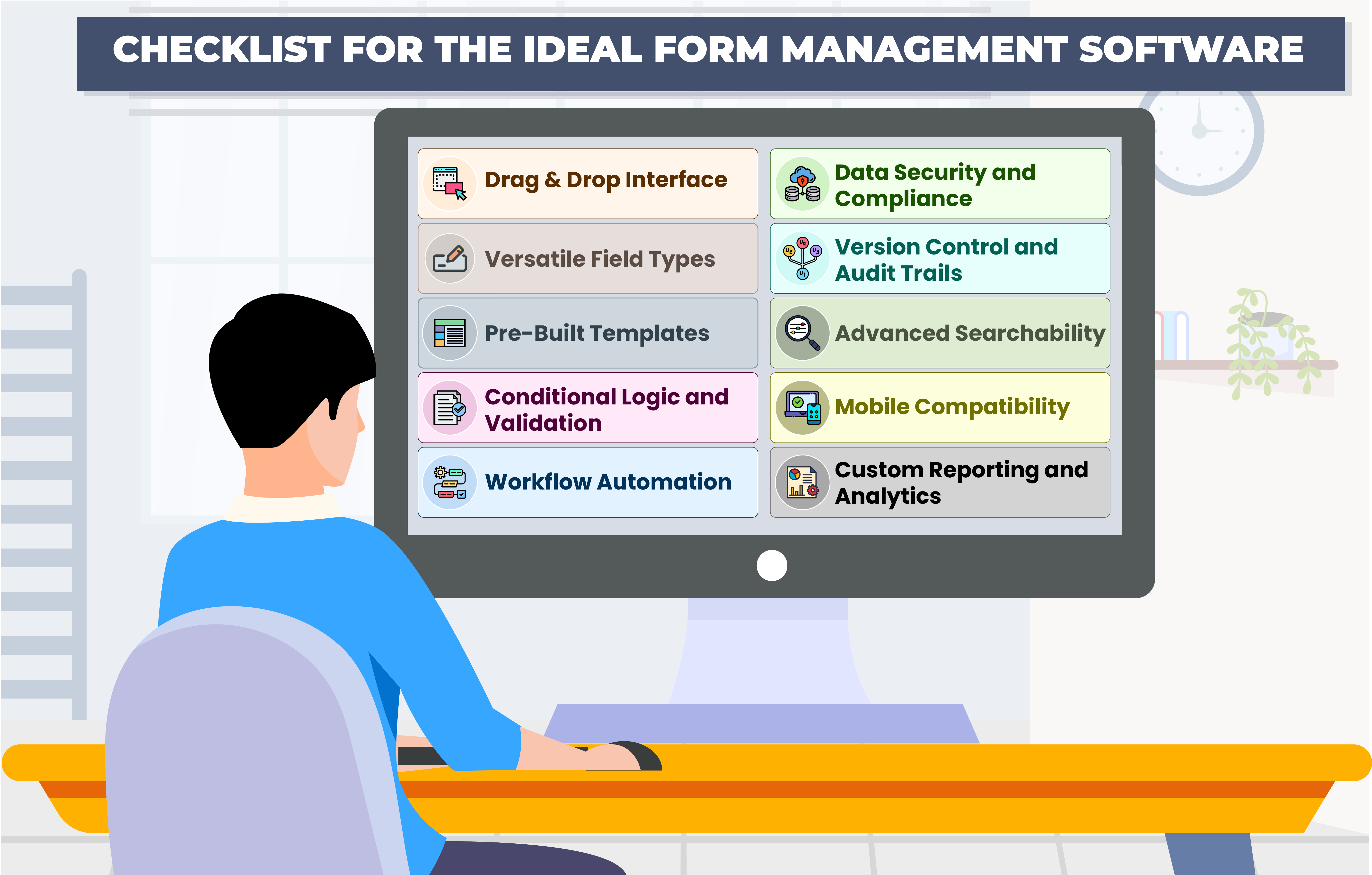
Here’s a comprehensive checklist of 10 top features to consider in form management software:
The software should have an intuitive drag-and-drop form builder that allows users to create, customize, and update forms effortlessly without requiring technical expertise. Look for tools that offer flexibility in design while maintaining simplicity in usage.
A form management system should support a variety of field types, such as text, dropdowns, checkboxes, date pickers, and file uploads. This ensures adaptability for different types of data collection needs.
Having access to a library of pre-designed templates for common use cases saves time and ensures consistency.
The software should enable dynamic forms where fields appear based on specific user inputs or conditions while implementing validation rules to ensure data accuracy by setting rules for mandatory fields, input formats, or permissible values.
Opt for software that enables automated workflows, such as triggering notifications, approvals, or tasks based on submitted form responses. This elevates efficiency in the record management process, reducing manual intervention.
Ensure the software complies with relevant data protection regulations such as GDPR, or SOC 2, depending on your industry. Features like role-based access, encryption, and secure data storage are paramount for safeguarding sensitive information.
Versioning ensures that all form changes are tracked, and audit trails provide transparency in form usage, making the software suitable for industries requiring strict compliance and accountability.
Effective software should include powerful search tools like keyword search, filters, and metadata tagging. This enables quick retrieval of records, boosting efficiency.
With teams often on the go, the software should support mobile devices, allowing forms to be filled out anytime, anywhere. Offline functionality can be a significant advantage for locations with limited internet connectivity.
Choose software that provides insightful reporting and analytics tools. These features enable organizations to monitor trends, generate actionable insights, and make data-driven decisions.
By focusing on these key features, you can ensure that your form management system is future-ready, efficient, and aligned with your organization’s needs.
Overview
Smart Food Safe’s Smart Record is a record management software solution born out of the necessity to replace the traditional mundane techniques of maintaining paper records with digital record-keeping. Smart Record makes it possible with an online form builder incorporated with features such as drag-and-drop form creator, hence converting any form into powerful online templates for convenient paperless record management.
Features
Overview
Jotform is an online form builder designed to simplify the creation of forms and the collection of data. Used by a wide range of organizations, including nonprofits, educational institutions, small businesses, and enterprises, it offers tools to enhance information gathering and streamline processes. Jotform supports the creation of various forms such as payment forms, lead generation forms, registration forms, contact forms, and application forms.
Features
Overview
Zoho Forms is an online form builder that backs up data on the cloud. With a drag-and-drop form builder that is responsive on all mobile devices, Zoho Forms also offers native mobile applications for iOS and Android devices. Zoho Forms supports task assignments, approval workflows, and simple mobile forms.
Features
Overview
Forms.io is an online tool designed to help users create and host forms for data collection. It offers the flexibility to host forms on a cloud server or a user’s own server. The platform includes a data-gathering engine that dynamically populates new fields based on user input, simplifying the process for respondents as they complete the form.
Features
Overview
Newgen’s Electronic Documents Record Management System (EDRMS) provides a comprehensive solution for managing enterprise records throughout their lifecycle, including creation, maintenance, usage, and disposition. The system is designed to support the accountability of both physical and electronic records by ensuring their authenticity, reliability, and integrity.
Features
Overview
Typeform is an online form builder designed to help users create engaging and visually appealing forms. It is widely used for crafting interactive surveys, with questions thoughtfully designed to make it easy for respondents to provide their answers. The platform offers flexibility and a variety of tools to assist users in designing forms and managing collected data, much like working with a spreadsheet.
Features
Overview
Formstack automates manual processes, accelerates solution delivery, and transforms ideas into workflows in minutes—all without the need for coding. By integrating a visual workflow automation builder with digital forms, document generation, and eSignature capabilities, Formstack empowers you to create endless solutions to simplify daily tasks and meet your customers’ digital needs effortlessly.
Features
Overview
Paperform is an online platform designed to help small businesses and teams streamline their work processes. It serves as a centralized tool for managing tasks like sales, bookings, customer communication, and automating manual workflows. With an intuitive editor that supports extensive customization and advanced workflows, users can create tailored solutions that align with their specific needs and preferences.
Features
Overview
AidaForm is a cloud-based survey tool designed for creating online forms, gathering customer feedback through templates, and evaluating responses. Survey results can be exported to Microsoft Excel or Google Sheets for data analysis, and users have the option to customize forms with themes, visuals, and brand-specific elements.
Features
Overview
PandaDoc is a platform used by over 50,000 customers to create, manage, e-sign, and notarize documents efficiently. It offers a centralized, digitized workflow designed to reduce inefficiencies and enhance productivity, allowing users to prioritize critical tasks over administrative workload.
Features
Smart Record aims to equip its users to do so much more with a record than ever possible with conventional form management systems. Let’s put it this way, how about directly recording the operational temperature or humidity readings into digital records in an automated process without any manual intervention? Well, Smart Record facilitates this and more. A set of specific inventive but very handy features for the users makes Smart Record stand out in the form management software market.
⇒ Dynamic Online Form Builder
Smart Record empowers users to create highly customizable forms with ease, leveraging an intuitive drag-and-drop interface. This feature enables the inclusion of various field types such as text fields, dates, and times, while allowing users to configure layouts with components like columns, panels, and data grids. Advanced tools like conditional formatting and field validations ensure the forms are not only visually appealing but also functional and user-friendly.
⇒ Voice, Bluetooth & IoT Integration
Staying ahead of technological trends, Smart Record integrates voice commands, Bluetooth connectivity, and IoT devices. Users can effortlessly create and manage records using voice inputs, eliminating manual entry and improving productivity. Bluetooth integration simplifies data collection by enabling automatic capture from paired devices, while IoT compatibility ensures real-time data updates from connected sensors and beacons. With a growing library of supported devices, users can incorporate their existing tools for smooth and accurate data synchronization.
⇒ Smart Scheduling & Notifications
Efficient task management is a cornerstone of record keeping, and Smart Record excels by providing an effective scheduling system. Users can assign tasks, such as record creation and review, with customizable frequencies and tolerance periods. A built-in user calendar helps track upcoming deadlines, while multi-level notification settings ensure timely updates on critical actions like submission, approval, or rejection. Notifications can be tailored to user preferences, whether via email, SMS, or in-app alerts.
⇒ Advanced Traceability & Audit Logs
Traceability and transparency are at the heart of Smart Record’s design. The software enables users to monitor product flow through the supply chain using customizable traceability flows based on key data such as lot numbers. A stage-based workflow streamlines record handling, encompassing creation, review, and approval phases with clear visibility at each step. The audit log captures all changes, maintaining a detailed version history and fostering accountability.
⇒ Comprehensive Template Library
Smart Record’s template library simplifies form management by offering pre-designed layouts that can be cloned and customized. This reduces the effort of building templates from scratch. Users can also preview forms across devices to ensure compatibility and link relevant documents from the Smart Docs module for reference. The ability to export records in formats like PDF, Excel, or CSV enhances data sharing and backup capabilities.
⇒ Offline Record Keeping
Recognizing the challenges of unreliable connectivity, Smart Record offers offline record creation through its Android and iOS applications. Users can continue their tasks without interruption, with locally stored records automatically syncing when back online. Access to master data and in-progress records in offline mode further ensures seamless operations, making Smart Record a reliable tool for on-the-go data management.
⇒ Interactive Dashboard & Reporting
The interactive dashboard in Smart Record equips users with powerful reporting tools to monitor compliance and trends. Predefined reports provide a snapshot of records at various stages, such as pending approval or completed. Customizable reports, combined with flexible filters, allow users to retrieve and analyze non-compliance data with precision. The trend analysis feature offers valuable insights into process performance, enabling data-driven decision-making.

 French
 Spanish
 Portuguese